



Quick Summary
This blog explores how Native Modules bridge JavaScript and platform-specific code in React Native applications. Learn how native bridging enables access to device features, improves performance, integrates third-party libraries, and helps build powerful Android and iOS apps from a shared codebase.
Key Takeaways
-
- Native Modules act as a bridge between React Native JavaScript code and Android or iOS native code
- Bridging enables access to platform-specific features such as cameras, sensors, GPS, and secure storage
- Native code can improve performance for computationally intensive operations and complex integrations
- React Native developers can create reusable Native Modules for use across multiple projects
- The integration process involves creating, exporting, and importing Native Modules between native and JavaScript layers
- Native bridging helps deliver a more responsive and truly native user experience
Want to build high-quality Android and iOS applications for the efforts, cost, skills, and development time of one? Or Do you want to add Native capabilities to your React Native app?
Let’s explore a bridge between JavaScript and specific operating systems that connects the dots for a smooth React Native app development.
This blog is a complete guide to the importance and use of Native Modules and how you can build or add cross-platform app functionalities with a single codebase through Native bridging in Android and iOS React Native apps.
The Best of React Native
To simplify mobile app development for Android and iOS platforms from a single JavaScript codebase, React Native acts as a React Dom for the web. But instead of using HTML and Dom as building blocks for UI, it uses the native components you would find in Android and iOS. The philosophy is ‘learn once and write anywhere.
Most importantly, if you want different user experiences based on the underlying OS, the platform modules allow you to check which platform you are on and render different components accordingly.
Native Modules – Bridge Between React Native and Native Code
React Native app has two sides in the development environment.
- JavaScript side
- Native side
The Native side consists of Kotlin or Java for Android app development and Objective C or Swift for iOS app development. One of the prime reasons for React Native’s popularity is the Native bridge that permits the JavaScript code and Native language to interact smoothly with each other.
The Real Need of the Bridge
As React Native provides a variety of pre-built components and APIs to build sophisticated UIs, there are development scenarios that need platform-specific functionality integration like sensors, GPS, or cameras that require native functionality. This is when the ‘Native Modules’ came into action to leverage the full-fledged benefits of React Native app development. It bridges the gap between the JavaScript and native APIs of iOS and Android platforms.

In many scenarios, not every native functionality is directly accessible from JavaScript. Here, the Native Modules become the intermediaries by enabling mobile app developers to build unique native code modules that invoke from javaScript. Native modules are an important means to tap the native code and gain the platform-specific functionalities within your React Native app.
Let’s explore the benefits of Native Modules and how they significantly improve the application functionalities to offer high-performance React Native app development services.
Why Use Native Modules?
- Native Modules help access the device-specific functionalities that are impossible through React Native’s pre-built APIs. This is for features like camera functionalities, hardware-specific sensors, and seamless integration with 3rd party API libraries.
- It helps improve the overall performance of your cross-platform application. Due to the direct access to device functionalities and low-level optimization, certain operations and computations are efficiently handled by native code.
- Native animations, integrations, and interactions can make your app more responsive and truly native to build user-friendly user experiences.
- The Native Module built once can also be reused in different projects which also helps replicate platform-specific features seamlessly.
How to Integrate Native Modules in React Native Apps?
The process to integrate Native modules in your React Native app is simple for scenarios where you have to access Native platform features like hardware-specific functionalities, 3rd party library integration, or to optimize the performance-specific components. Let’s take a quick ride to this simplified process.
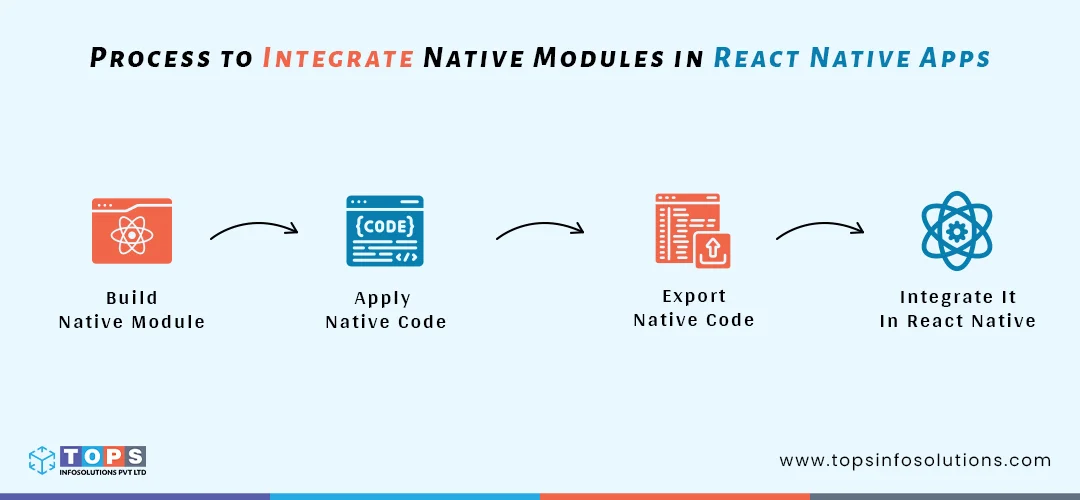
Step 1: Build a New Native Module
To make a new native module, build a new module with specific functionalities required for your project using the command below.
react-native create-library <library-name>
This will help you build a new directory with the particular library name, inside which will be subdirectories for Android and iOS, containing the code for native modules for each OS.
Step 2: Apply Native Code
It is possible to apply native code separately for Android and iOS. You need to follow the OS-specific instructions. For Android, apply the native code in Kotlin or Java. For iOS, apply the native code in Swift or Objective C.
Step 3: Export Native Code
Now export the native code using the following command in order to use this native code in React Native.
module.exports = NativeModules.<module-name>;
Step 4: Integrate Native Module in React Native App
To apply the Native Module in your React native app, import the Native module in your JavaScript code using the following command.
import { <module-name> } from '<library-name>';
This will import and give a specific name to the Native Module from the specified library which can easily be used in JavaScript code.
Use Cases of Native Modules
- Native Modules are used to access device sensors like magnetometers, accelerometers, or gyroscopes, helping you build innovative apps that strongly rely on precision motion data.
- Build advanced camera functionalities and features.
- Secure offline storage and encryption.
- Integration of 3rd party native libraries into the React Native codebase.
Beyond the cross-platform capabilities and ways to improve React Native app performance, the flexibility to integrate platform-specific functionalities with the help of Native Modules serves as a strong bridge between JavaScript and native code. This helps boost your app performance, functionalities, and user experiences, making your React Native app stand out in competitive markets.
Why Partner With TOPS To Build Your App?
If you are looking to make your app the best it can be. It sounds simple but the reality is- it involves setting up the infrastructure, developing features, fixing bugs, and the list goes on.
Partnering with TOPS is the best solution as we become your extended tech team that lets you focus on what matters the most for your business while our team reliably builds digital products tailor-made to your business needs.
Over the years, we have built agile and faster development cycles supported by AI development and research tools, ensuring high-quality digital products with optimum development costs. This will help you get to the market faster with a strong and secure backend app infrastructure along with a clean and intuitive frontend app that’s user-friendly and stunning for end users.
Let’s make your app development journey a total business value creation.

Frequently Asked Questions (FAQs)
Native Modules are custom components that allow React Native applications to communicate with Android native code (Java or Kotlin) and iOS native code (Swift or Objective-C), enabling access to platform-specific functionality.
Bridging enables JavaScript code to interact with native APIs and device capabilities that are not directly available through React Native’s built-in components, helping developers build more powerful applications.
Developers should use Native Modules when they need access to device hardware, native SDKs, advanced camera features, biometric authentication, secure storage, sensors, or third-party native libraries.
Native Modules execute performance-intensive operations directly on the native layer, reducing JavaScript overhead and improving speed, responsiveness, and overall application performance.
For Android, Native Modules are typically built using Java or Kotlin. For iOS, developers use Swift or Objective-C to implement native functionality.
Yes. Native Modules can be packaged as reusable libraries, allowing developers to integrate the same platform-specific functionality across multiple React Native applications.
Common use cases include camera integration, GPS tracking, biometric authentication, push notifications, secure offline storage, payment gateway integrations, Bluetooth connectivity, and device sensor access.
Native Modules provide access to advanced device features, improve application performance, enable third-party SDK integrations, enhance user experiences, and extend the capabilities of React Native beyond its default APIs.