









































Quick Summary
This post walks through how we completed a full AI agent CRM integration in under six weeks — from scoping the use case to shipping a production-ready agent. We cover the architecture decisions we made, the friction points that nearly blew the timeline, and the specific choices that kept the project on track.
Key Takeaways:
-
- A narrow scope is what makes speed possible. The agent did three things well, not ten things poorly
- CRM data quality is the most underestimated blocker in any AI agent CRM integration
- Human-in-the-loop checkpoints are not optional at this stage of agentic AI maturity
- Post-launch monitoring matters as much as the build itself
Most AI agent projects don’t fail during the build. They stall.
Teams are stuck in an endless loop of proof-of-concept demos, stakeholder alignment meetings, and architecture debates that never resolve.
The result: a project that should take six weeks takes six months, and the team loses confidence in agentic AI before it ever ships anything real.
We’ve seen this pattern across enough AI agent CRM integration projects to know where the time actually goes.
To avoid it, it’s crucial to know the to-dos before proceeding with an implementation plan. In the following article, we talk about how we went from a confirmed scope to a production agent in under six weeks.
Not because the project was simple, but because we made a specific set of decisions early that removed ambiguity and kept the build moving.
After implementing an AI agent in CRMs, the sales teams saved closer to 11 hours per week. For a sales team handling lead summarization, follow-up drafting, and pipeline checks manually, this significantly changes how much time is actually spent selling rather than maintaining the CRM.
What Is an AI Agent in CRM?
An AI agent in a CRM is a software system that can access permitted customer and sales data, reason over that information, and perform predefined CRM tasks with limited human intervention. Unlike a traditional automation rule, an AI agent can interpret unstructured information such as notes, emails, and activity history before producing an output or recommending an action.
How We Integrated an AI Agent into a CRM in 6 Weeks
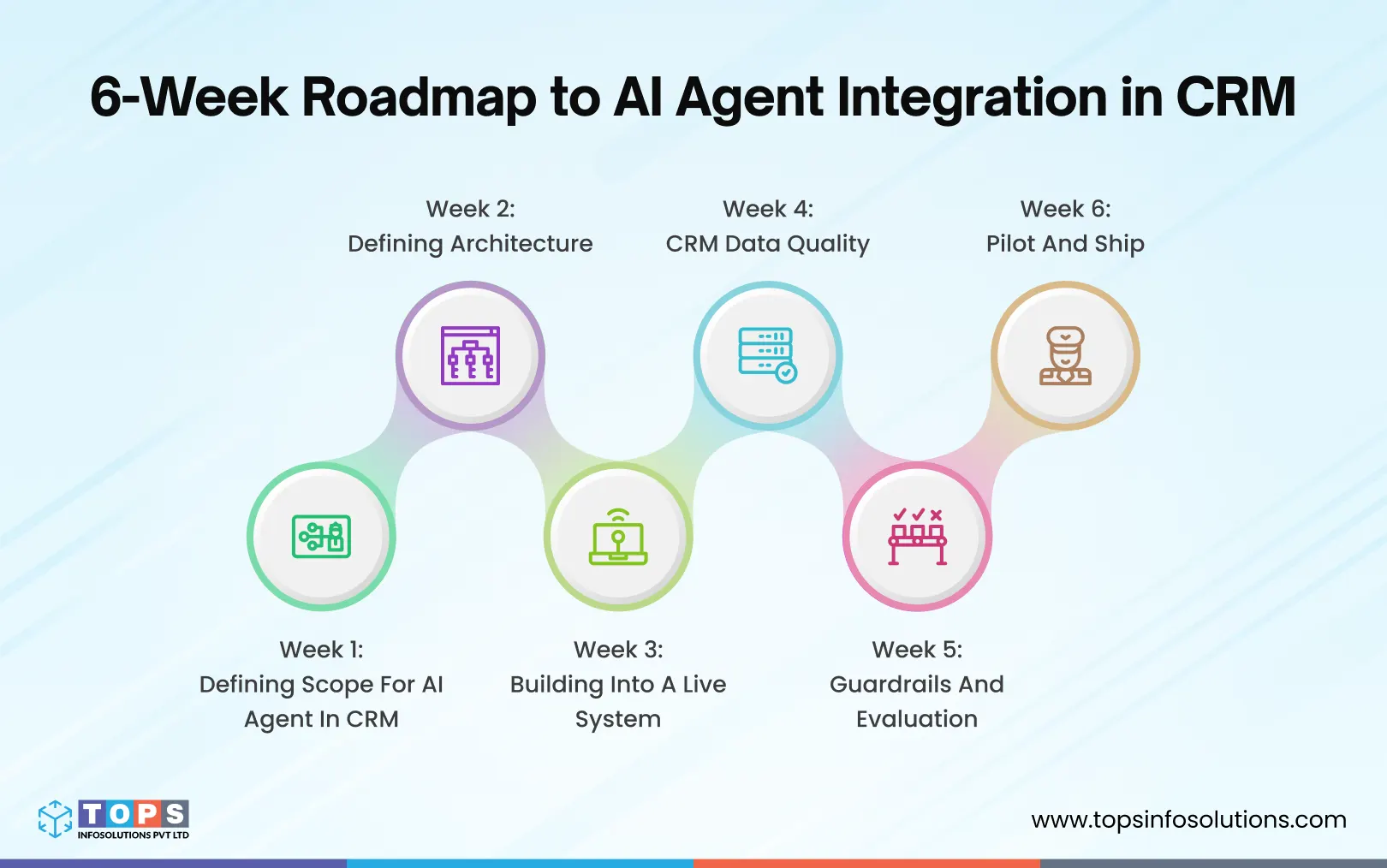
Week 1: Scoping High-Impact AI Agent Use Cases for CRM
The first conversation on most AI agent projects is about capability. What can the agent do? It’s the wrong starting point.
The right question is: what does the CRM currently do badly that a well-scoped agent could do reliably?
For this project, that answer was clear. The sales team was spending significant time on three tasks that required intelligence but not judgment. This was the kind of work where an AI agent with access to the right data could outperform a human on speed without creating unacceptable risk if it got something slightly wrong.
-
Lead summarization
Pulling together activity history, company data, and last interaction notes into a one-paragraph brief before a call.
-
Follow-up email drafting
Generating a first draft based on call notes, deal stage, and contact context, for reps’ review before sending.
-
Pipeline status updates
Surfacing stale deals and flagging which ones need action, based on last-touch date and stage duration.
This scope decision was made in the first week and never revisited. It is, more than anything else, why the project shipped on time.
Week 2: Defining Architecture
Since we had built the CRM ourselves, the agent wasn’t connecting to an external system. The architecture conversation shifted from integration to boundaries: what the agent could access, what it couldn’t touch, and how it would sit alongside features already in production.
Access boundaries were defined at the data layer.
Owning the codebase meant the agent could theoretically access anything, which is exactly why explicit constraints mattered more, not less.
- Read and write permissions were set at the data layer, not the application level.
- The agent had direct access to contact records, deal history, and activity logs, and was explicitly excluded from everything else.
- Write operations were limited to two actions: saving a summary to the contact record and creating a draft communication.
The agent was built as an independent module
Rather than coupling the agent to existing application logic, it was built as a self-contained module communicating with the data layer through defined internal interfaces.
The agent used a retrieval-based approach to ground outputs in current CRM data rather than relying solely on the model’s general knowledge. We used a similar approach in our RAG as a Service solutions, where AI retrieves the right information before generating an answer. The same idea also plays an important role in our Agentic AI Services, helping AI agents work with business data and complete specific tasks while keeping the right level of human control.
Week 3: Building Into a Live System
The CRM was already in production and actively in use. Introducing an AI agent in CRM workflows that were live meant one priority above everything else: don’t break what’s already working.
The agent was feature-flagged before it touched production
- Togglable per user, per role, or system-wide. Any instability could be isolated without affecting CRM functionality
- Allowed incremental rollout rather than exposing all users at once
Existing workflows were mapped before development began
- Every data touchpoint the agent would read from or write to was documented upfront
- Regression checks were run on existing functionality at each touchpoint before and after the agent code was introduced
Coupling was kept deliberately loose
- The agent communicated through internal interfaces, not direct model calls
- Changes to existing CRM features didn’t require corresponding changes to agent logic
Week 4: CRM Data Quality
Building the CRM meant we knew the system inside out. But it also meant we owned the data problems. Years of real usage, evolving team processes, and incremental configuration changes had left the data in a state the agent couldn’t work reliably with.
Before any meaningful AI integration in CRM workflows could happen, the data structure had to be addressed first.
Contact records were incomplete and inconsistent
Sales research shows that only 35% of sales professionals completely trust the accuracy of their organisation’s data.
Missing fields, duplicate entries, and conflicting values across records meant the retrieval layer was surfacing unreliable inputs before they even reached the LLM.
Custom fields had been used inconsistently across the team
The CRM had been configured and reconfigured for years. Custom fields that were meant to capture structured data had become catch-all text boxes used differently by every rep. This made them unreliable as agent inputs.
- Field values ranged from structured entries to free-text notes to blank, depending on who had filled them in.
- No validation rules existed to enforce consistent input formatting.
- We had to build normalisation logic to standardise field values before passing them to the retrieval layer.
The same failure mode shows up constantly in eCommerce and marketplace data. Product attributes, categories, and descriptions that look structured in the schema but are populated inconsistently across catalog updates, channel syncs, and manual edits over time.
The retrieval layer needed a structured extraction step
Rather than passing raw CRM records directly into the prompt, we added an intermediate step that formatted retrieved data into a consistent schema first. This change alone improved output consistency significantly.
- Raw records were parsed and mapped to a fixed schema before reaching the LLM
- Fields with null or unreliable values triggered fallback behaviour rather than being passed through empty
- Prompt length and structure became predictable, which made prompt engineering considerably more controlled
This is also where most agentic AI projects either earn trust or lose it. Retrieval quality directly affects the quality of the output. No amount of prompt engineering can make up for an agent working with incomplete, outdated, or inconsistent data. That’s why our agentic AI builds at TOPS start with a data audit before we scope any agent capabilities, whether the underlying system is a CRM, ERP, or custom-built operational tool.
For small businesses exploring agentic AI CRM tools for small businesses, this step is especially important because the quality of the CRM data can directly impact how well a CRM agent or multiple CRM AI agents perform. In some cases, businesses may even want to create a custom CRM quoting system for a small business where the AI agent can work with customer details, product information, pricing, and quoting workflows. At the end of the day, an agent is only as reliable as the data layer underneath it.
Week 5: Guardrails and Evaluation
The agent was drafting communications using real customer data. A single hallucinated detail would permanently break reps’ trust. This week was dedicated entirely to preventing that.
We built a structured evaluation set before any output reached a user
Testing in production wasn’t an option. Every model configuration was run against a controlled input set before the agent touched live data.
- 50 inputs across contact types, deal stages, and data completeness levels
- Tracked factual accuracy, tone consistency, and hallucination rate per output
- No configuration moved forward without clearing the full set
Confidence thresholding handled low-quality inputs
When retrieved CRM data was incomplete, the agent flagged uncertainty rather than generating a confident-sounding output from weak inputs.
- Outputs below a set threshold were labelled “low confidence: review carefully”
- Threshold logic was tied to data completeness in the retrieved record
- Reps received a consistent signal for when to scrutinise rather than trust an output
Human-in-the-loop was a feature, not a fallback
Every output required reps’ confirmation before anything left the CRM. This was a deliberate design decision, not a temporary constraint.
- No output was sent, saved, or actioned without explicit reps’ approval
- Confirmations and rejections were logged to build a feedback dataset for future tuning
Week 6: Pilot and Ship
Rather than going straight to full rollout, we ran a structured internal pilot with a small group of reps on live deals before opening access to the full team.
The pilot caught what testing couldn’t
Controlled evaluation sets are useful. But real reps using the agent on real deals surface edge cases that no test set anticipates.
- Three reps used the agent across active deals for a week and a half before full rollout.
- Every output was monitored in real time; edge cases were logged and resolved immediately.
- The evaluation set was expanded from 50 to 80 cases based on what the pilot surfaced.
Rollout was narrow by design
When the agent went live for the full team, the scope was identical to what had been piloted.
- All outputs remained draft-and-confirm; nothing was sent or saved without reps’ approval
- Every write action was logged from day one
- A feedback flagging mechanism was live at launch, so reps could mark outputs for review
What to Watch for Post-Launch
Shipping the agent was week six. Here’s what we put in place, and what we continued monitoring, once it was live.
We monitored output quality systematically, not anecdotally
Informal feedback only surfaces the failures that frustrated someone enough to report them. Most quality drift goes unnoticed without a structured process.
CRM data hygiene became a hard dependency
Before the agent, a missing field was a minor inconvenience. After, it’s a direct input into the outputs that reps act on. Set field completion standards and communicate them as part of the rollout.
Watch for prompt injection and model drift
Two risks that are easy to overlook once the agent is live and running smoothly. Free-text CRM fields are potential attack surfaces; build input sanitisation into the retrieval layer. Treat your evaluation set as a regression test suite and run it every time the underlying model changes.
Read Also : – AI Agent Security Checklist: Before You Give Agents Access to Production
What This Could Look Like for Your Business
The specifics of this build were unique to one CRM. But the pattern isn’t. Most mid-market teams are sitting on a system with the same underlying shape: rich operational data, manual synthesis work that eats hours every week, and a clear opportunity for a narrowly scoped agent to take it on.
The same logic applies whether that system is a CRM, an eCommerce platform managing catalog and inventory data, or a marketplace tool tracking orders across channels.
A few signals this approach could apply to your team:
- Reps or operators spend recurring time summarising records, drafting follow-ups, or flagging stale items by hand
- The data lives in a system you already use daily, such as CRM, eCommerce platform, or internal ops tool
- Product, order, or customer data is structured on paper but inconsistent in practice. Different team members, channels, or sync processes have populated it differently over time
- You’d rather start with three well-defined tasks than a sprawling “AI for everything” initiative
What this isn’t: a replacement for your team. Every output in this project (and in how we approach agentic AI generally) went through a human before anything left the system. The agent did the synthesis work; people made the judgment calls. That’s a deliberate design choice, not a current limitation waiting to be removed.
What a first project usually looks like: a short scoping conversation to identify the two or three highest-friction manual tasks, an honest look at the underlying data before any build work starts, and a timeline shaped by how clean that data already is. It took six weeks here because the scope stayed narrow. That’s usually the right place to start, regardless of the system involved.
Final thoughts
A six-week timeline for integrating an AI agent into a CRM results from making the right decisions early and staying disciplined about scope throughout.
A few things that made the difference:
- Scope was locked in week one and never revisited
- Building into an owned codebase removed external complexity but introduced its own discipline
- Data quality work was unplanned, and it almost always is
- Human-in-the-loop was a design decision, not a temporary constraint
If you’re weighing whether AI agents make sense for your CRM, eCommerce platform, or internal systems, the first useful step usually isn’t a build; it’s a conversation about where the time is actually going today.
Frequently Asked Questions (FAQs)
For a well-scoped integration with three to five agent capabilities, six to ten weeks is a realistic target for a team with prior agentic AI experience. Poorly scoped projects, data quality issues, or complex auth requirements can push timelines to four to six months. The biggest variable is how long the scope definition takes not the build itself.
For a single-agent CRM integration, LangChain remains the most practical choice, it has the largest ecosystem, the most CRM-specific tooling, and the most community support for debugging. CrewAI and AutoGen become more relevant when you’re coordinating multiple agents across a workflow. Don’t over-architect for multi-agent complexity on a first integration.
Three things together: ground the agent strictly in retrieved CRM data rather than letting it reason from general knowledge, build an evaluation set and test every model configuration against it before launch, and add a confidence flagging mechanism so low-confidence outputs are surfaced as drafts requiring careful review rather than clean outputs.
For AI agents integration in CRM, the data scope is almost always narrower than teams expect. For lead summarisation and follow-up drafting, the agent needs contact details, company data, deal stage and history, activity log, and recent email thread. Nothing beyond that.
When the agent is built into a system you own, permissions are a design decision rather than an external negotiation. Set access boundaries at the data layer so the agent can only read and write to the specific models it needs. Log every write action the agent performs from day one, and use feature flagging to control which users the agent is active for during rollout.
Native CRM AI features (Salesforce Einstein, HubSpot Breeze) are worth evaluating first. They require no integration work and are improving quickly. Build a custom agent when your use case requires data from outside the CRM, when you need behavior the native tool doesn’t support, or when you need full control over the model, prompts, and output handling. Custom builds take longer but give you an asset you own and can extend.