













Choosing the right Node.js framework can influence how quickly a development team builds an application, how easily it scales, and how much effort it takes to maintain the codebase over time. While some frameworks focus on lightweight routing, others provide structured architectures, built-in development tools, or support for real-time applications.
Node.js continues to be a practical choice for backend development because it allows developers to use JavaScript or TypeScript across different parts of an application. It is commonly used for REST APIs, SaaS platforms, real-time applications, microservices, and data-intensive web systems.
However, not every project needs the same framework. A startup building its first product may prefer a minimal setup, whereas an enterprise application with multiple teams may benefit from a more structured architecture. Similarly, an application that relies on frequent updates between users may need real-time communication capabilities that a conventional web framework does not provide on its own.
In this guide, we explore 15 Node.js frameworks and server-side development tools to consider for projects in 2027. You’ll learn what each option offers, where it fits best, its main advantages and limitations, and how to select a framework based on your application’s requirements.
What Is a Node.js Framework?
A Node.js framework is a software foundation that helps developers build server-side applications using Node.js. It provides reusable components, conventions, and tools for handling tasks such as HTTP requests, routing, middleware, input validation, authentication, and API development.
Without a framework, developers can build applications using Node.js’s built-in modules. However, they would need to implement more of the application’s routing, request handling, and supporting infrastructure themselves.
Frameworks reduce this repetitive work and help teams organize application code more consistently. Depending on the framework, they may also provide dependency injection, database integration, testing utilities, real-time communication, or application scaffolding.
For example, Express.js provides a relatively minimal foundation for building web servers and APIs. NestJS offers a more structured approach with modules, controllers, and dependency injection. Fastify focuses on an efficient HTTP server experience with schema-based validation and a plugin architecture.
It’s also important to distinguish a framework from a runtime or library. Node.js is the JavaScript runtime, while tools such as Socket.IO primarily provide real-time communication capabilities rather than a complete general-purpose web framework. If you’re still deciding whether Node is the right runtime rather than which framework to put on top of it, our guide to Node.js for backend development covers that ground first.
Why Do Developers Use Node.js Frameworks?
Node.js frameworks can help development teams:
- Build APIs faster: Use established routing, request-handling, and middleware patterns instead of repeatedly implementing them.
- Organize complex applications: Separate business logic, controllers, services, and data-access layers where the framework supports these patterns.
- Improve maintainability: Follow consistent conventions that make applications easier for other developers to understand.
- Support real-time features: Combine suitable frameworks and communication libraries to implement chat, notifications, collaboration, and live dashboards.
- Improve security practices: Apply validation, authentication, authorization, and other controls through suitable libraries and carefully configured application code.
- Scale applications appropriately: Choose deployment models and architectural patterns that support growing workloads without unnecessary complexity.
A framework does not automatically make an application secure, scalable, or fast. Those outcomes depend on implementation quality, database design, infrastructure, testing, and operational practices. The right choice depends as much on your team and timeline as on the framework itself something we work through with clients at the start of every Node.js development engagement.
Best Node.js Frameworks for Web Development
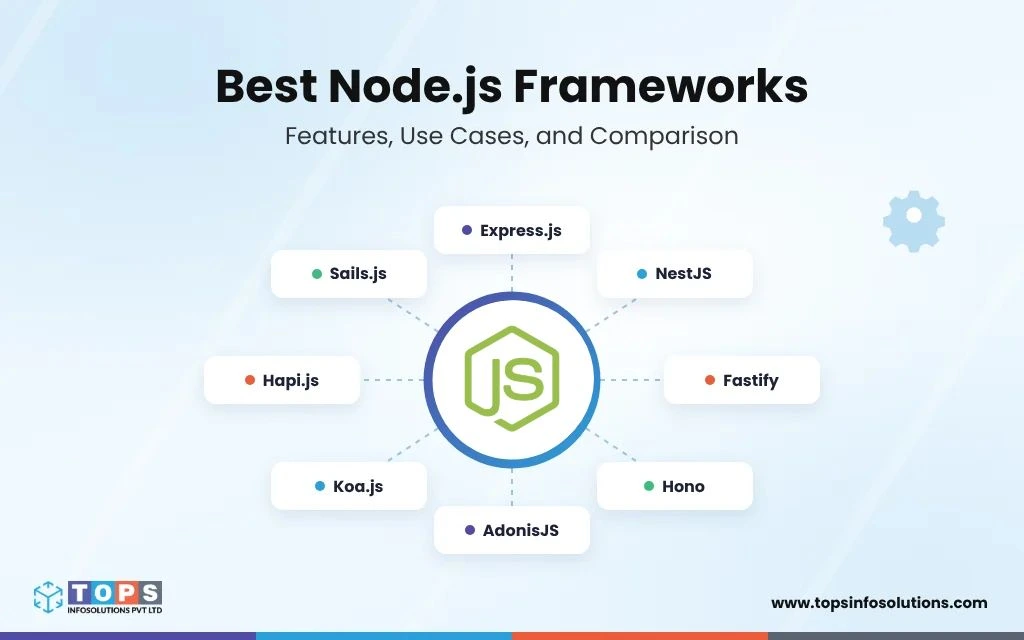
The following frameworks serve different development needs. Rather than treating this list as a universal ranking, use it to understand which options are worth evaluating for your project.
1. Express.js
Best for: REST APIs, web servers, and flexible backend applications
Express.js is a minimal and flexible web framework for Node.js. It gives developers a straightforward way to define routes, process HTTP requests, configure middleware, and return responses without requiring a rigid application structure.
Express is also the “E” in both MEAN and MERN, so teams working in either are already using it, our MEAN stack development page covers how it fits alongside MongoDB, Angular and Node.
Its flexibility makes Express a practical choice for projects ranging from small backend services to larger applications organized around a team’s preferred architecture. Developers can select their own validation libraries, database tools, authentication methods, and testing frameworks.
Express 5 introduced changes from Express 4, including improved handling of rejected promises returned by route handlers and middleware. Teams upgrading existing applications should review the migration documentation and test their routes and middleware for compatibility.
Key features of Express.js
- Flexible routing and middleware.
- Support for REST API development.
- Integration with databases, authentication tools, and third-party services.
- A large ecosystem of community packages.
- Freedom to organize application code around project requirements.
Advantages of Express.js
Express is approachable for developers who want to understand how a Node.js backend works. Its minimal design also makes it easier to integrate with an existing technology stack without adopting an extensive set of framework conventions.
Limitations of Express.js
Express does not prescribe a complete architecture. As an application grows, teams need to establish their own standards for validation, error handling, testing, dependency management, and code organization.
When should you choose Express.js?
Choose Express for lightweight APIs, custom web backends, prototypes, and applications where flexibility matters more than built-in architectural conventions. It is also worth considering when maintaining an existing Express codebase is more practical than migrating to another framework.
2. NestJS
Best for: Enterprise applications, TypeScript backends, and microservices
NestJS is a progressive Node.js framework designed to help developers build structured and maintainable server-side applications. It uses TypeScript by default and draws on concepts such as modules, controllers, providers, decorators, and dependency injection.
Its architecture helps teams separate application responsibilities into clear components. For example, an eCommerce backend might have separate modules for customer accounts, product catalogs, inventory, orders, payments, and notifications.
NestJS supports Express by default and can also use Fastify through an adapter. It offers additional patterns and integrations for WebSockets, microservices, testing, and API development.
Key features of NestJS
- Modular application architecture.
- TypeScript-first development.
- Dependency injection.
- Support for REST APIs and GraphQL integrations.
- Integration options for microservices and WebSockets.
- Testing utilities and development conventions.
Advantages of NestJS
NestJS is useful when several developers need to work on the same application without creating inconsistent code structures. Its conventions can also make it easier to test individual services and maintain business logic over time.
Limitations of NestJS
The framework introduces more concepts and structure than a minimal framework such as Express. Small projects with only a few routes may not benefit enough from that additional complexity.
When should you choose NestJS?
Consider NestJS for enterprise software, SaaS platforms, complex API systems, and applications that require clear module boundaries. It is especially suitable for teams already comfortable with TypeScript.
3. Fastify
Best for: Performance-conscious APIs and backend services
Fastify is a web framework for Node.js built around an efficient HTTP server experience, a plugin-based architecture, and schema-driven request and response handling.
Developers can define schemas for incoming requests and outgoing responses. These schemas help validate data and can support serialization, improving consistency across API endpoints.
Fastify also emphasizes encapsulation. Plugins can be organized into separate contexts, making it easier to manage features and their dependencies as an application grows.
Key features of Fastify
- Schema-based validation and serialization.
- Plugin architecture.
- Structured logging support.
- Hooks for request and response processing.
- TypeScript support.
- Extensibility for API-focused applications.
Advantages of Fastify
Fastify provides useful building blocks for teams developing APIs that need consistent validation, clear plugin boundaries, and performance-conscious request handling.
Limitations of Fastify
Teams need to understand its plugin registration, encapsulation, and schema conventions. Performance should also be measured under the application’s actual workload rather than assumed from framework benchmarks alone.
When should you choose Fastify?
Choose Fastify when building REST APIs, backend services, or request-intensive applications where validation, serialization, and efficient request processing are important design considerations.
4. Hono
Best for: Lightweight APIs and applications across multiple JavaScript runtimes
Hono is a lightweight web framework with a TypeScript-friendly API and support for multiple JavaScript runtimes. Although it is strongly associated with edge and serverless development, it can also run on Node.js through its Node.js adapter.
This makes Hono worth evaluating when a team wants to share similar routing patterns across different deployment environments. A developer may use it for a compact API, an internal service, or an application deployed across supported runtime platforms.
Hono is not tied exclusively to Node.js, so compatibility should be checked for the runtime and adapters used by a specific project.
Key features of Hono
- Lightweight routing.
- TypeScript support.
- Middleware and request-handling utilities.
- Adapters for supported runtimes.
- A compact API for building HTTP services.
Advantages of Hono
Hono is a good candidate for projects that value a small framework surface and runtime flexibility. Its approach can be useful for APIs deployed in serverless or edge-oriented environments.
Limitations of Hono
Teams should verify the availability of required Node.js integrations and third-party packages. Runtime portability does not mean every Node.js library will work unchanged in every supported environment.
When should you choose Hono?
Consider Hono for small-to-medium APIs, lightweight services, and applications that need to operate across supported JavaScript runtimes. Evaluate its ecosystem against your specific dependencies before committing to it.
5. AdonisJS
Best for: Full-featured web applications and convention-based development
AdonisJS is a TypeScript-oriented Node.js framework that provides a more integrated development experience than a minimal HTTP framework.
Instead of assembling every supporting component independently, developers can work with framework conventions and integrated tools for common application requirements. Depending on the version and packages selected, these may include routing, validation, authentication, database access, and testing support.
This approach can be useful for teams that want a consistent way to build and maintain business applications without designing every architectural decision from scratch.
Key features of AdonisJS
- TypeScript-oriented development.
- Structured application conventions.
- Integrated tooling for common web development tasks.
- Support for database-backed applications.
- Authentication and validation options.
- Testing and development utilities.
Advantages of AdonisJS
AdonisJS can reduce the amount of initial setup required for conventional web applications. Its integrated approach also helps teams follow consistent patterns across projects.
Limitations of AdonisJS
Teams have less freedom than they would with a minimal framework when they choose to follow its conventions. Before starting a project, check the current ecosystem, supported versions, and integration requirements.
When should you choose AdonisJS?
Consider AdonisJS for business applications, administrative systems, and database-driven products where integrated tooling and consistent development conventions are valuable.
6. Koa.js
Best for: Custom middleware pipelines and lightweight web services
Koa.js is a lightweight web framework created by the team behind Express. It provides a small core and uses modern JavaScript features, including async functions, to support request processing through middleware.
One of Koa’s defining characteristics is its middleware execution model. Middleware can perform work before passing control to the next function and then continue processing after that function completes. This pattern can be useful for logging, error handling, request transformation, and response processing.
Koa intentionally provides fewer built-in features than a full-stack framework, leaving developers to select the additional components they need.
Key features of Koa.js
- Lightweight core.
- Async middleware.
- Centralized request and response handling.
- Extensible architecture.
- Support for custom API and web application structures.
Advantages of Koa.js
Koa gives experienced developers control over middleware design and application architecture. It can be a good fit for services that need a small, customizable foundation.
Limitations of Koa.js
Routing, validation, authentication, and other functionality may require additional packages. Teams must also establish their own standards for structuring and maintaining larger applications.
When should you choose Koa.js?
Choose Koa when you want a minimal framework and prefer to build your middleware stack around specific project requirements. If your team needs extensive built-in conventions, consider NestJS or AdonisJS instead.
7. Hapi.js
Best for: Structured APIs and configuration-driven server applications
Hapi.js is a framework for building web applications and APIs with an emphasis on configuration, validation, plugins, and explicit request handling.
Rather than relying on a highly minimal setup, Hapi provides a structured approach to defining routes and configuring their behavior. This can help teams manage validation, authentication strategies, error handling, and application plugins in a consistent way.
Its plugin system also allows developers to separate features into reusable units.
Key features of Hapi.js
- Configuration-driven routing.
- Request validation and lifecycle controls.
- Authentication strategy support.
- Plugin-based extensibility.
- Centralized server configuration.
Advantages of Hapi.js
Hapi can be suitable for applications where explicit configuration and well-defined request handling are important. Its conventions help make server behavior easier to inspect and manage.
Limitations of Hapi.js
Developers accustomed to Express may need time to learn Hapi’s configuration patterns. Teams should evaluate the current plugin ecosystem and compatibility of required dependencies before adopting it.
When should you choose Hapi.js?
Consider Hapi for API-driven applications and backend services where structured configuration, validation, and plugin organization align with the team’s development practices.
8. Sails.js
Best for: MVC applications and database-driven web platforms
Sails.js is a Node.js framework built around the Model-View-Controller (MVC) architectural pattern. It aims to provide a familiar structure for applications that need organized routes, data models, controllers, and application services.
Sails is particularly associated with data-driven applications and includes Waterline, an object-relational mapping and data-access layer designed to work with supported databases and adapters.
It also provides features that can help developers build applications with real-time requirements, although the appropriate setup depends on the selected version and integrations.
Key features of Sails.js
- MVC-based application organization.
- Data modeling through Waterline.
- Routing and controllers.
- Database adapter integrations.
- Support for applications with real-time requirements.
Advantages of Sails.js
Sails can help teams organize conventional business applications without assembling every component separately. Its MVC conventions can be useful for developers who prefer a familiar separation of responsibilities.
Limitations of Sails.js
Its conventions and data-access abstraction may not be ideal for teams that want complete control over database interactions. Verify maintenance activity, package compatibility, and the project’s long-term requirements before adoption.
When should you choose Sails.js?
Consider Sails for database-driven applications that benefit from MVC organization. For new projects, compare its ecosystem and conventions with AdonisJS and NestJS before deciding.
9. LoopBack
Best for: API-centric systems and data-source integrations
LoopBack is an extensible Node.js framework designed for building APIs and connecting applications to different data sources and services.
It is particularly relevant to projects where developers need a structured API layer between a database, an internal system, and external consumers. Its tooling can help define models, organize API behavior, and connect supported data sources.
For organizations modernizing existing systems, this approach can be useful when several applications need to access consistent business data through defined interfaces.
Key features of LoopBack
- Structured API development.
- Model and repository patterns.
- Connectors for supported data sources.
- Extensible architecture.
- Tools for defining and managing API behavior.
Advantages of LoopBack
LoopBack can help teams organize data access and API development when an application has multiple integrations or data sources.
Limitations of LoopBack
The framework’s abstractions and generated structures may be unnecessary for simple APIs. Teams should confirm compatibility with their preferred databases, authentication systems, and current dependency versions.
When should you choose LoopBack?
Evaluate LoopBack for integration-heavy applications, structured API platforms, and systems where its data-source and repository patterns fit the architecture.
10. Feathers
Best for: Real-time applications and service-oriented APIs
Feathers is a framework for building APIs and real-time applications around reusable services. It can expose application functionality through HTTP APIs and, with suitable configuration, real-time communication channels.
A service-oriented approach can help developers separate business capabilities into independent components. For example, a collaboration platform might have services for users, projects, messages, notifications, and activity feeds.
Feathers also provides integration options for different databases and authentication approaches.
Key features of Feathers
- Service-oriented application design.
- REST API support.
- Real-time communication options.
- Authentication integrations.
- Database adapters and extensibility.
Advantages of Feathers
Feathers can simplify development when an application needs consistent service interfaces alongside real-time updates. Its service-based structure can also support reusable business logic.
Limitations of Feathers
Real-time capabilities and deployment behavior still depend on the selected transports, adapters, and infrastructure. Teams must design authorization and event access carefully so that users receive only the information they are permitted to see.
When should you choose Feathers?
Consider Feathers for collaborative platforms, notification systems, live dashboards, and applications where real-time interactions are an important requirement.
11. Meteor
Best for: Full-stack JavaScript applications and reactive user experiences
Meteor is a full-stack JavaScript platform designed to simplify development across the application stack. It provides tools and patterns for connecting application logic, data, and user interfaces, with an emphasis on reactive data updates.
It can be useful for applications where users need to see changing information without repeatedly refreshing the page. Examples include collaboration tools, internal dashboards, community applications, and products with shared live data.
Meteor’s approach differs from that of a backend-only framework because it includes tooling intended to support broader application development.
Key features of Meteor
- Full-stack JavaScript development.
- Reactive data capabilities.
- Client-server integration.
- Application build and development tooling.
- Integration options for frontend frameworks.
Advantages of Meteor
Meteor can reduce the amount of infrastructure developers need to assemble for certain full-stack applications. Its reactive model can also be useful for products where synchronized data is central to the user experience.
Limitations of Meteor
Teams should assess its current ecosystem, preferred frontend approach, deployment requirements, and data synchronization model. It may be less suitable for teams that only need a small standalone API.
When should you choose Meteor?
Consider Meteor when building full-stack products that benefit from integrated development tooling and reactive data flows.
12. ElysiaJS
Best for: Type-safe server applications, particularly in the Bun ecosystem
ElysiaJS is a TypeScript-oriented web framework known for its type inference and developer experience. It is designed primarily around Bun, a JavaScript runtime that provides its own execution environment and development tools.
The framework emphasizes defining routes and schemas in ways that allow TypeScript to infer types across parts of an application. This can help developers catch certain errors during development and create more consistent API contracts.
However, ElysiaJS should not be presented as interchangeable with every Node.js framework. Teams planning to deploy on Node.js must verify the current compatibility and support of the relevant Elysia version and dependencies.
Key features of ElysiaJS
- TypeScript-focused development.
- Type inference and validation patterns.
- Route and schema definitions.
- Plugin-based extensibility.
- Strong association with the Bun runtime.
Advantages of ElysiaJS
Its type-oriented approach can appeal to developers who want a closely integrated development experience and clear API contracts.
Limitations of ElysiaJS
Runtime compatibility is a critical consideration. A project that depends on Node.js-specific packages or infrastructure should validate those dependencies before choosing ElysiaJS.
When should you choose ElysiaJS?
Evaluate ElysiaJS when its type-safety approach fits your project and Bun is an acceptable runtime. If Node.js is a firm requirement, compare it with Fastify, NestJS, and Hono’s Node.js adapter before making a decision.
13. Nitro and H3
Best for: Lightweight server applications and modern deployment environments
Nitro and H3 are related server-side tools, but they serve different roles.
H3 is a lightweight HTTP framework for building server handlers and APIs. Nitro is a server engine that builds on server-side tooling to provide application packaging and deployment support across supported environments.
Together, they are relevant to developers building server-side applications that need flexible deployment targets. They are also associated with the Nuxt ecosystem, although their use is not limited to a single application structure.
Key features of Nitro and H3
- Lightweight HTTP request handling through H3.
- Server build and deployment tooling through Nitro.
- Support for appropriate runtime and deployment adapters.
- Modular server routes and handlers.
- Integration with the broader Nuxt ecosystem.
Advantages of Nitro and H3
This combination can simplify server-side development when teams want lightweight request handling and deployment-oriented tooling. It is particularly worth evaluating for modern web applications with multiple deployment requirements.
Limitations of Nitro and H3
Nitro and H3 should not be described as two interchangeable general-purpose frameworks. Their capabilities, runtime compatibility, and deployment features depend on the versions and adapters used.
When should you choose Nitro or H3?
Choose H3 when you need a lightweight HTTP framework. Evaluate Nitro when you also need server build and deployment capabilities. For a conventional standalone API, compare the required features with Fastify or Express.
14. Strapi
Best for: Content-driven applications, headless CMS platforms, and API-powered websites
Strapi is an open-source, Node.js-based headless content management system (CMS) that helps developers build APIs and manage application content through an administrative interface. Unlike general-purpose frameworks such as Express.js or NestJS, Strapi focuses on content modeling, content management, and delivering data to websites, mobile apps, and other digital platforms.
Developers can define content types, manage entries, configure permissions, and expose content through REST or GraphQL APIs. This makes Strapi useful for businesses that need a centralized content platform serving multiple digital experiences.
Key features of Strapi
- Custom content types and content modeling.
- REST and GraphQL API capabilities.
- Administrative interface for content management.
- Role-based access and permissions.
- Extensibility through plugins and custom development.
Advantages of Strapi
Strapi reduces the amount of custom content-management functionality developers need to build from scratch. It can help teams separate content administration from the frontend, making content reusable across websites, mobile applications, and other channels.
Limitations of Strapi
Strapi is a headless CMS rather than a general-purpose Node.js web framework. Teams building complex business logic or specialized backend services may still need a separate framework or custom application code. Database support, deployment requirements, and feature availability should be verified against the selected Strapi version.
When should you choose Strapi?
Consider Strapi when building content-heavy websites, digital platforms, product catalogs, or applications that need a centralized content API. If you need a general-purpose backend framework instead, evaluate Express.js, NestJS, or Fastify.
15. Restify
Best for: API-focused backend services
Restify is a Node.js framework designed specifically for building REST APIs and backend services. Unlike a general web application framework, its design focuses on API request handling and server behavior.
This specialization can be useful for services that primarily expose endpoints to mobile applications, frontend clients, internal systems, or other services.
Restify can be considered when an API-focused approach fits the project better than a broader application framework.
Key features of Restify
- API-oriented server development.
- Routing and request handling.
- Middleware and plugin options.
- Support for service-based backend architectures.
Advantages of Restify
Restify’s API-focused design can be useful for teams that want a server centered on REST services rather than a broader web application structure.
Limitations of Restify
Its suitability depends on current maintenance, dependency compatibility, and ecosystem requirements. Teams should compare the benefits of its API-specific approach with Fastify and Express before selecting it for a new application.
When should you choose Restify?
Consider Restify for API-only services when its conventions meet your requirements. For new projects, evaluate Fastify and Express alongside it to determine which ecosystem and operational model best fit your team.
Node.js Framework Comparison Table
Choosing a framework becomes easier when you compare its primary purpose, architectural approach, and suitability for your project. The following table summarizes the options discussed above.
| Framework | Primary use case | Architecture / approach | Key consideration | Version | Last release |
|---|---|---|---|---|---|
| Express.js | General web apps and APIs | Minimal and flexible | Requires architectural decisions | 5.3.0 | 9 Oct 2026 |
| NestJS | Enterprise backends | Modular, dependency injection | More structure to learn | 12.3.2 | 27 Oct 2026 |
| Fastify | APIs and backend services | Plugins and schemas | Understand its validation and plugin model | 5.12.7 | 13 Oct 2026 |
| Hono | Lightweight, multi-runtime APIs | Compact and portable | Check adapter compatibility | 4.13.14 | 25 Oct 2026 |
| AdonisJS | Full-featured web apps | Convention-based | Assess ecosystem and conventions | 7.6.0 | 5 Oct 2026 |
| Koa.js | Custom web services | Async middleware | More supporting packages may be needed | 3.2.1 | 28 Oct 2026 |
| Hapi.js | Structured APIs | Configuration and plugins | Learn its configuration patterns | 21.4.12 | 28 Oct 2026 |
| Sails.js | Database-driven applications | MVC | Check maintenance and compatibility | 1.5.18 | 27 May 2026 |
| LoopBack | Data-integrated APIs | Models and repositories | Evaluate its abstractions | 8.0.0 | 24 Oct 2026 |
| Feathers | Real-time and service-based apps | Reusable services | Plan event permissions carefully | 5.0.50 | 11 Sep 2026 |
| Meteor | Full-stack reactive apps | Integrated client-server tooling | Assess stack and deployment fit | 3.5.4 | 28 Oct 2026 |
| ElysiaJS | Type-safe applications | Type inference, Bun-oriented | Verify Node.js compatibility | 1.4.30 | 28 Oct 2026 |
| Nitro / H3 | Server-side apps and deployment | HTTP framework plus server engine | Understand the distinct roles | 2.13.5 / 2.0.8 | 19 / 22 Oct 2026 |
| Strapi | Headless CMS, content-driven websites, and API-powered applications | Open-source Node.js platform with REST and GraphQL APIs, a customizable admin panel, plugins, and content modeling | Review the latest Strapi releases, official documentation, GitHub activity, and plugin compatibility before adoption. | 5.60.0 | 29 Oct 2026 |
| Restify | REST APIs | API-focused server | Compare with modern alternatives | 12.1.0 | 23 Oct 2026 |
Version data read from the npm registry on 29 October 2026.
Not sure which framework best fits your project? The right choice depends on your application’s complexity, performance requirements, team expertise, and long-term maintenance needs. You can hire experienced Node.js developers to help evaluate your options and build an application around your business goals.
How to Choose the Right Node.js Framework for Your Project
The best Node.js framework is the one that supports your application requirements without introducing unnecessary development or maintenance costs. Before making a decision, consider the following factors.
1. Define the application requirements
Start with what you need to build rather than the framework’s popularity.
For example, an application that exposes a few REST endpoints has different requirements from a multi-tenant SaaS platform with complex permissions, background jobs, and integrations.
List your expected features, data flows, performance requirements, and deployment constraints. Then shortlist frameworks that support those needs.
2. Consider project complexity and team size
A small application may benefit from the simplicity of Express or Hono. A larger application with multiple modules and several developers may benefit from NestJS’s structure or AdonisJS’s integrated conventions.
The goal is not to choose the framework with the most features. It is to choose a foundation that matches the complexity of the application you expect to maintain.
3. Evaluate performance under realistic workloads
Framework benchmarks can help identify candidates, but they should not be the only factor in your decision.
Application performance also depends on database queries, external API calls, payload size, caching, authentication, and infrastructure. A framework with excellent raw HTTP throughput may not produce a faster application if the database or a third-party service is the bottleneck.
Test representative workloads before making performance claims or committing to a framework.
4. Check TypeScript support
TypeScript can improve maintainability by catching certain errors before runtime and providing stronger tooling for larger codebases.
NestJS, Fastify, Hono, and AdonisJS are worth evaluating for TypeScript-oriented development. The best choice depends on how their type systems, validation patterns, and libraries fit your team’s workflow.
5. Review integrations and ecosystem maturity
Most business applications need more than routing. They may require database access, authentication, payment processing, email services, monitoring, logging, background jobs, and cloud deployment.
Before choosing a framework, confirm that the required libraries are maintained and compatible with your runtime and framework versions. This is especially important for newer tools or projects with smaller ecosystems.
6. Plan for security and maintenance
A framework alone cannot guarantee application security. Teams need appropriate authorization, input validation, secure session management, secrets handling, dependency updates, logging, and testing.
Review the framework’s security guidance and consider how easily your team can maintain the application over several years.
7. Test a representative feature before committing
Build a small proof of concept that reflects the actual application. Include a database query, authentication, request validation, error handling, and at least one external integration.
Measure development effort and runtime behavior, and assess how easy the implementation is to test and maintain. This provides more useful evidence than choosing a framework based on popularity alone.
Which Node.js Framework Is Best for Enterprise Applications?
For enterprise software, framework selection should account for architecture, maintainability, integrations, security requirements, and the development team’s experience.
NestJS is a strong candidate for applications that need modular architecture and consistent conventions. Fastify is worth considering for API-focused services where schema-based validation and efficient request handling are important. Express remains useful when flexibility and familiarity are priorities.
AdonisJS may be a better fit when a team wants integrated tooling for conventional business applications. LoopBack can be evaluated for systems with complex API and data-source integration needs.
For larger systems, the framework is only one architectural decision. Database design, API contracts, caching, queues, observability, deployment, and access controls often have a greater influence on long-term reliability.
Before choosing, ask these questions:
- Can the framework support our authentication and authorization requirements?
- Does it integrate with our databases, APIs, and cloud platform?
- Can we test and monitor the application effectively?
- Will new developers be able to understand and maintain the code?
- Does the framework support our deployment model?
- Is the project actively maintained, and are its dependencies compatible with our requirements?
Frequently Asked Questions About Node.js Frameworks
There is no universally best Node.js framework. Express is a flexible option for general-purpose APIs, NestJS is suitable for structured enterprise applications, and Fastify is worth considering for performance-conscious services. Hono is another option for lightweight applications that need runtime portability.
Choose based on your architecture, integrations, team expertise, and deployment requirements rather than a general ranking.
Yes. Express remains a practical option for building web servers and REST APIs. Its minimal design and ecosystem make it suitable for many projects. However, teams should establish their own standards for validation, error handling, testing, and application structure.
Express, Fastify, NestJS, Hapi, LoopBack, and Restify are all options to evaluate. Fastify offers schema-oriented request handling, NestJS provides a structured application architecture, and Express gives developers greater freedom to assemble their own components.
NestJS is a strong option when teams need structured modules and integrated microservice patterns. Express and Fastify can also be used to build microservices with a custom architecture.
The right choice depends on service boundaries, communication protocols, deployment requirements, and operational tooling.
NestJS is often worth shortlisting for enterprise applications because of its modular architecture, dependency injection, and TypeScript support. AdonisJS and Fastify may be better fits for other requirements.
Evaluate security, integrations, maintainability, and team experience before deciding.
Express is a minimal web framework that gives developers considerable freedom over application structure. NestJS provides more built-in conventions through modules, controllers, providers, and dependency injection.
Express may be simpler for small APIs, while NestJS can make complex applications easier to organize. Both can support substantial production systems when implemented appropriately.
Performance depends on the workload, framework versions, middleware, validation, serialization, and deployment configuration. Fastify is designed with performance in mind, but a benchmark result should not be treated as a guarantee that every Fastify application will outperform every Express application.
Run tests using realistic requests and dependencies before making a decision.
Node.js is a JavaScript runtime that allows JavaScript code to run outside a browser. A Node.js framework builds on that runtime to provide tools and conventions for developing applications.
For example, developers can create a server using Node.js’s built-in HTTP module or use a framework such as Express, Fastify, or NestJS to organize request handling and application logic.
Yes. Node.js frameworks can support real-time applications when paired with suitable communication technologies. Examples include chat platforms, collaboration tools, live dashboards, and notification systems.
The appropriate implementation may use WebSockets, Socket.IO, server-sent events, or another communication approach, depending on the application’s needs. Socket.IO itself is a real-time communication library rather than a general-purpose web framework.
No. Node.js applications can be developed with JavaScript or TypeScript. TypeScript can be particularly useful for larger projects because it provides static type checking and tooling that can improve code navigation and maintainability.
The decision should reflect the project’s complexity, team skills, and development standards.
Choose Express when flexibility and a minimal foundation are important. Consider Fastify when you want schema-oriented request handling and a performance-conscious API framework. Choose NestJS when a more structured architecture and dependency injection align with your application.
Build a small proof of concept if the differences materially affect your project.
Not necessarily. A migration is worthwhile when the current architecture creates significant maintenance problems, cannot meet new requirements, or has compatibility or support issues that justify the effort.
If the existing application is stable, a targeted modernization may offer better value than a complete rewrite. Evaluate migration costs, testing needs, dependencies, and potential downtime before proceeding.