






































Quick Summary
Giving an AI agent access to production systems means giving it the power to act, not just answer. This post walks through the AI agent security checklist CTOs should run before that happens, plus a phased rollout model and the security mistakes that teams make while building an AI agent.
-
- Why AI agents require a different security approach than traditional applications
- The core risks: prompt injection in AI agents, confused deputy attacks, and unmanaged AI
- The core controls every production agent needs: identity, least privilege, task boundaries, approval, access governance, isolation, monitoring, and incident response.
- How to safely move an agent from pilot to production
Most enterprises running AI agents in production have already been burned by one.
According to Gravitee’s State of AI Agent Security 2026 research, 88% report at least one confirmed or suspected agent security incident in the past year. Yet 82% of executives still believe their existing policies protect them. That gap is the whole problem.
Picture an AI support agent with legitimate access to your payments system. A customer ticket contains a hidden instruction meant for the AI. The agent follows it and triggers an unintended action.
Nothing was hacked. No credentials were stolen. The agent simply trusted content it shouldn’t have.
That’s the security challenge with production AI agents. They can make decisions and act on untrusted inputs. Before giving an agent production access, you need to know what it can access, what it can do, and how you will monitor it.
This article walks through that checklist, section by section, so you can run it against your own agents this week.
Why AI Agents Need a Different Security Model
Traditional applications have fixed interfaces. A user clicks a button, a request follows a predictable path, and the system does one predetermined thing. AI agents function differently. They read messy, real-world content, including tickets, emails, and documents, then decide what to do next.
That combination is what changes the risk profile. A traditional application generally follows predefined logic. An agent can interpret an unexpected instruction and turn it into an action.
What Is Agent Security?
Agent security is the discipline of controlling three things: what an agent can access, what actions it’s allowed to take, and how visible those actions are after the fact. It’s about making sure that when something goes wrong, the impact is small and the trail is clear.
Two Threats CTOs Should Understand
Two concepts come up constantly in agent security discussions, and both matter more than a generic warning.
Indirect prompt injection: An AI agent can read untrusted content like a webpage, a document, or a ticket with hidden instructions. It follows instructions as if they came from a legitimate source. Prompt injection in AI agents isn’t a sign the agent is broken. It’s doing exactly what it’s designed to do: process content and act on it.
Confused deputy: An agent can use legitimate permissions you gave it to perform an action you never intended. The agent has the authority because you granted it. The problem is what triggers that authority.
AI Agent Security Checklist: 8 Controls Before Production
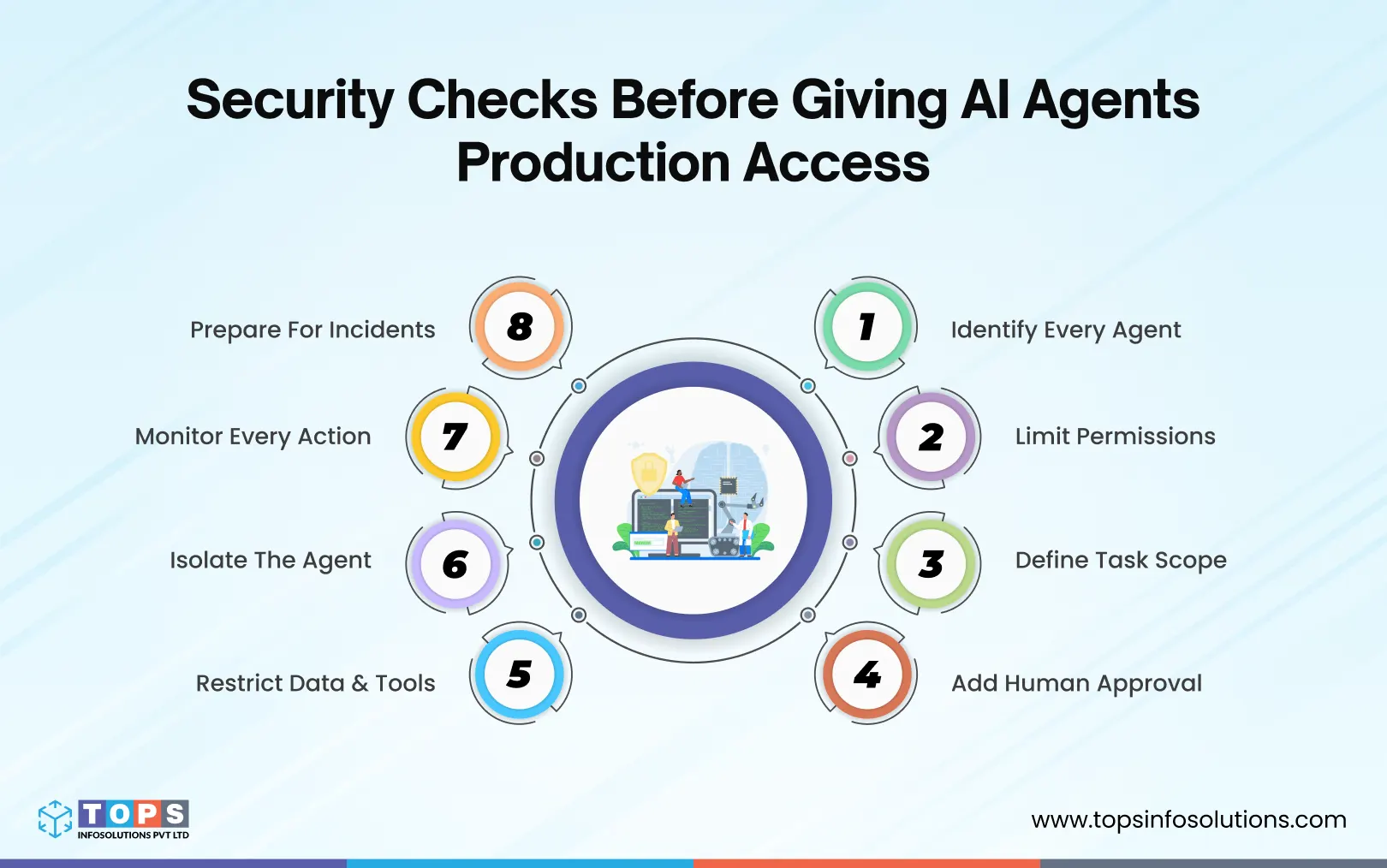
If you need to start somewhere to check the agent before granting access, Getting these controls right is a design decision, not a hardening pass. It belongs in the architecture phase of any custom AI development project, check these.
1. Identity: Can You Clearly Identify the Agent?
Start with a basic assessment. If an agent did something in production right now, you need to know which agent it was and who owns it. Give every production agent its own identity instead of a shared login, assign a human or team as the accountable owner, and use short-lived credentials instead of hardcoded, long-lived ones. If you can’t trace an action back to an agent and an owner, nothing else on this list will hold up under investigation.
2. Least Privilege: Can the Agent Do Only What It Needs?
Least privilege for AI agents means giving each agent only the permissions it needs to complete its assigned tasks. The instinct when building an agent is to give it broad access so it “just works” without hitting permission walls mid-task. Resist that. Scope permissions per tool and per system instead of routing everything through one service account. And separate read, write, and destructive actions so a summarization task can never accidentally trigger a delete.
3. Task Scope: Is the Agent’s Job Clearly Defined?
Take an email-summarization agent: it only needs to read a mailbox. But if it’s also connected with send and forward permissions for flexibility, a single prompt injection in one incoming email is enough to make it forward sensitive mail straight to an attacker. The fix is removing capabilities the task never needed in the first place, so read_inbox is the only scope it holds.
4. Human Approval: Which Actions Require Manual Review?
Not everything needs a human in the loop, and trying to gate every action kills the speed agents are supposed to add. But draw a line where there are irreversible or high-consequence actions like a payment, a deletion, or an external send. Add an approval step before they execute. Reversible, low-risk actions can run on their own. These AI agent guardrails create boundaries around what an agent can access and what it can do, limiting the impact of both mistakes and attacks.
5. Data and Tool Access: Can the Agent Reach Only What It Needs?
An agent should only be able to reach the data its specific task requires, nothing broader. Just as important, treat everything the agent reads, including customer emails, scraped pages, and support tickets, as untrusted input. Any tool with network egress should also be explicitly allow-listed rather than open by default.
6. Isolation: Is the Agent Contained If Something Goes Wrong?
Think of this as a blast-radius question. If one agent gets manipulated or misfires, can it reach systems it has no business touching? Run agents in a sandboxed or isolated environment separate from core infrastructure, and cap potential damage with rate limits, so a runaway loop hits an end instead of compounding.
7. Monitoring: Can You See What the Agent Is Doing?
AI agent monitoring and observability help you determine what the agent actually did, which tools it used, and whether its behavior is changing. Log every tool call and meaningful action. Attribute it to the specific agent and workflow involved, and build a baseline of normal behavior. In case of anything unusual, like a first-time tool call or a sudden spike in activity, you can flag it in advance.
8. Incident Response: Can You Stop and Recover?
An emergency plan only counts if it’s been used before the emergency. Test the kill switch before you need it, define rollback steps for actions the agent has already taken, and write the incident response plan for agent-specific failures now, not while one is happening.
What Secure Agent Access Looks Like in Practice
The clearest way to see this checklist matter is to compare two versions of the same agent.
The Risky Approach: Broad Production Access
Take the support-ticket agent from the opening scenario. If it runs on one broad service account with full read and write access to the payments system, the checklist above is effectively skipped. A manipulated instruction, a bad edge case, or a misread ticket can turn into a real, unauthorized production action, and there’s no clear distinction between the agent’s decision and the system executing it.
The Safer Approach: Scoped Access and Human Approval
The safer version of the same agent follows a different path: the agent investigates the ticket, prepares a proposed refund, a human reviews and approves it, the system executes the approved action, and the whole sequence is logged. Same capability, same speed for the team, but the agent never holds unilateral authority over money movement.
Roll Out Agent Access in Three Phases
Production access shouldn’t be granted all at once. A phased rollout lets you validate behavior before the agent can do real damage if something goes wrong.
1. Pilot With Read-Only Access
- Limit the agent to read-only tools and a narrow slice of data
- Observe how it behaves across real, varied inputs
- Test edge cases deliberately, not just the happy path
- Establish an initial behavioral baseline for monitoring
2. Add Scoped Actions
- Introduce specific, narrowly defined write permissions
- Add approval gates for any action with real consequences
- Apply rate limits and action-level controls
- Watch closely for unexpected or first-time tool calls
3. Move to Production
- Centralize logs in one place your security team can actually use
- Connect agent monitoring into existing security tooling where it makes sense
- Define an incident response procedure specific to agent failures
- Test the kill switch before you need it, not during an incident
- Schedule recurring permission reviews so scope doesn’t silently expand
Top 5 Common Mistakes That Create Agent Security Gaps
Even teams that build a solid checklist often lose ground to a handful of repeatable mistakes.
Using shared credentials: When multiple agents or workflows share one login, ownership, auditing, and incident investigation all become guesswork.
Giving one agent a broad service account: It’s faster to set up than scoped permissions, but it turns a single prompt injection into a system-wide incident instead of a contained one.
Treating logging as optional: Without reliable logs, there’s no way to reconstruct what an agent did or when a deviation started.
Skipping the kill-switch test: An emergency control that’s never been tested is a control you’re hoping works, not one you know works.
Giving production access too early: Predictable behavior in a pilot is the signal to expand scope. Enthusiasm for the demo isn’t.
Secure the Agent Before You Scale It
The goal was never to stop agents from taking useful action. It’s to make sure that action happens inside AI agent guardrails you defined on purpose, not ones you discover after an incident.
A production-ready agent has a clear identity, only the permissions its task actually requires, and enough monitoring for your team to catch and stop unexpected behavior before it compounds.
Frequently Asked Questions (FAQs)
Prompt injection is about the input: hidden instructions in content the agent reads. Confused deputy is about the outcome: the agent misusing legitimate permissions it was already granted. Injection is often the trigger; confused deputy is often the result.
Yes. Treat agents as a distinct identity class, similar to service accounts or non-human workloads. Give them their own credentialing, ownership, and revocation processes rather than folding them into existing human user policies.
Only what’s required for its current task, defined at the action level. If the agent’s job is drafting refunds, it needs draft access, not the ability to execute payments unsupervised. This is least privilege for AI agents in practice.
Sometimes, but it should be scoped narrowly and paired with approval gates for anything with real consequences, like financial transactions or customer data changes.
Even low-risk agents need basic action logging and a way to detect abnormal behavior. AI agent monitoring and observability should scale with the agent’s access, not just its perceived risk.
No. Read-only or low-stakes agents can often run autonomously. Approval gates should be reserved for actions that are hard to reverse or carry financial, legal, or customer-facing consequences.
Start with a read-only pilot against real, varied inputs, including deliberately adversarial ones. Validate behavior and logging before adding any write permissions.