












Quick Summary
The Claude Agent SDK is the agent behind Claude Code, packaged as a library your own software can run.
- It gives a Python or TypeScript application the same tools, agent loop, and context handling that Claude Code uses.
- Choose it when the agent must run inside your systems; choose Managed Agents when you would rather Anthropic host the loop.
- The best first agents do work that a rule, a rendered page, or a reviewer can check.
- Permission rules, hooks, and an approval callback decide what the agent may touch, and deny rules hold in every mode.
- Model usage, not hosting, is usually the highest running cost.
An AI pilot that answers questions is easy to build. An agent that does the work inside your systems, safely, is a different task altogether.
It has to read the right data, call the right tools, stop at the right points, and leave a record.
The Claude Agent SDK handles much of that plumbing, so your developers don’t build an agent loop from scratch.
The decisions stay with you: whether to build on the SDK, which workflows deserve an agent, and how much access to give it.
What Is the Claude Agent SDK?
The Claude Agent SDK gives you “the same tools, agent loop, and context management that power Claude Code,” programmable in Python and TypeScript. It needs Python 3.10 or later, or Node.js 18 or later.
It used to be called the Claude Code SDK. Anthropic renamed it after the same harness started running research, video, and note-taking agents, not just coding ones.
What comes built in
Out of the box, an SDK agent gets:
- Built-in tools to read and write files, run commands, and search the web
- MCP (Model Context Protocol) connections to outside tools and data sources
- Hooks that run your own code at set points in the agent’s work
- Subagents that take on focused subtasks
- Permissions that decide which tools run automatically and which need approval
- Sessions that keep context and can be resumed or forked later
- Skills, memory, and plugins loaded from the project
If MCP is new to your team, our guide to what MCP is covers the basics.
Agent SDK, Client SDK or Managed Agents: Which Fits Your Team?
There are four ways to build with Claude that you can consider, and they differ mainly in who runs the agent loop.
Four ways to build with Claude
| Option | Who runs the agent loop | Pick it when |
|---|---|---|
| Agent SDK | Your application, on infrastructure you operate | The agent must run inside your systems, under your rules |
| Client SDK | Your code calls the Claude API; you write the loop | You need single calls, or a custom loop with full control |
| Managed Agents (beta) | Anthropic’s hosted harness, with a managed or self-hosted sandbox | You want long-running agents without running the runtime |
| Claude Code CLI | A person working in a terminal | Developers doing interactive or one-off tasks |
Control vs. what you have to operate
The SDK’s main advantage is placement: the agent runs in a process you control, close to your data and under your network rules. The price is operational work. Your team runs the processes, stores session data, watches telemetry, and takes upgrades.
Check compliance early, though. Managed Agents is not currently eligible for Zero Data Retention or HIPAA BAA coverage, because it stores sessions, sandbox state, and outputs on its side. You can run the sandbox on your own infrastructure for data-residency needs, but that option is not described as making it eligible.
Which Business Workflows Suit an SDK Agent?
Not every repetitive task needs an agent. The strongest candidates take several steps, pull from more than one system, and end in a result someone can check.
The jobs Anthropic points to
Anthropic’s own examples are mostly business work. They include finance agents that analyze portfolios, support agents that escalate unclear tickets, and research agents that turn document sets into reports.
Its hosting guide adds invoice extraction, email triage, and a support agent that loads ticket history. For a wider view of where agents fit, see how agentic AI works.
The test: can someone check the result?
The most useful filter comes from Anthropic’s guidance on verification. An agent works best when a rule, a rendered result, or a reviewer can check its output. A rule might be a total that must reconcile. A rendered result is a page or document someone can look at.
If nobody can say whether the output is right, the agent’s mistakes have nowhere to surface.
When an agent is the wrong tool
Some jobs don’t need an agent:
- Fixed-rule work, such as routing a form to a queue, is cheaper and more predictable as a script.
- A single generation or classification step is one Client SDK call, not an agent loop.
- Work nobody will review is a poor first candidate, however repetitive it is.
How Does an Agent Work Through a Task?
The agent follows a comprehensive procedure to complete a task:
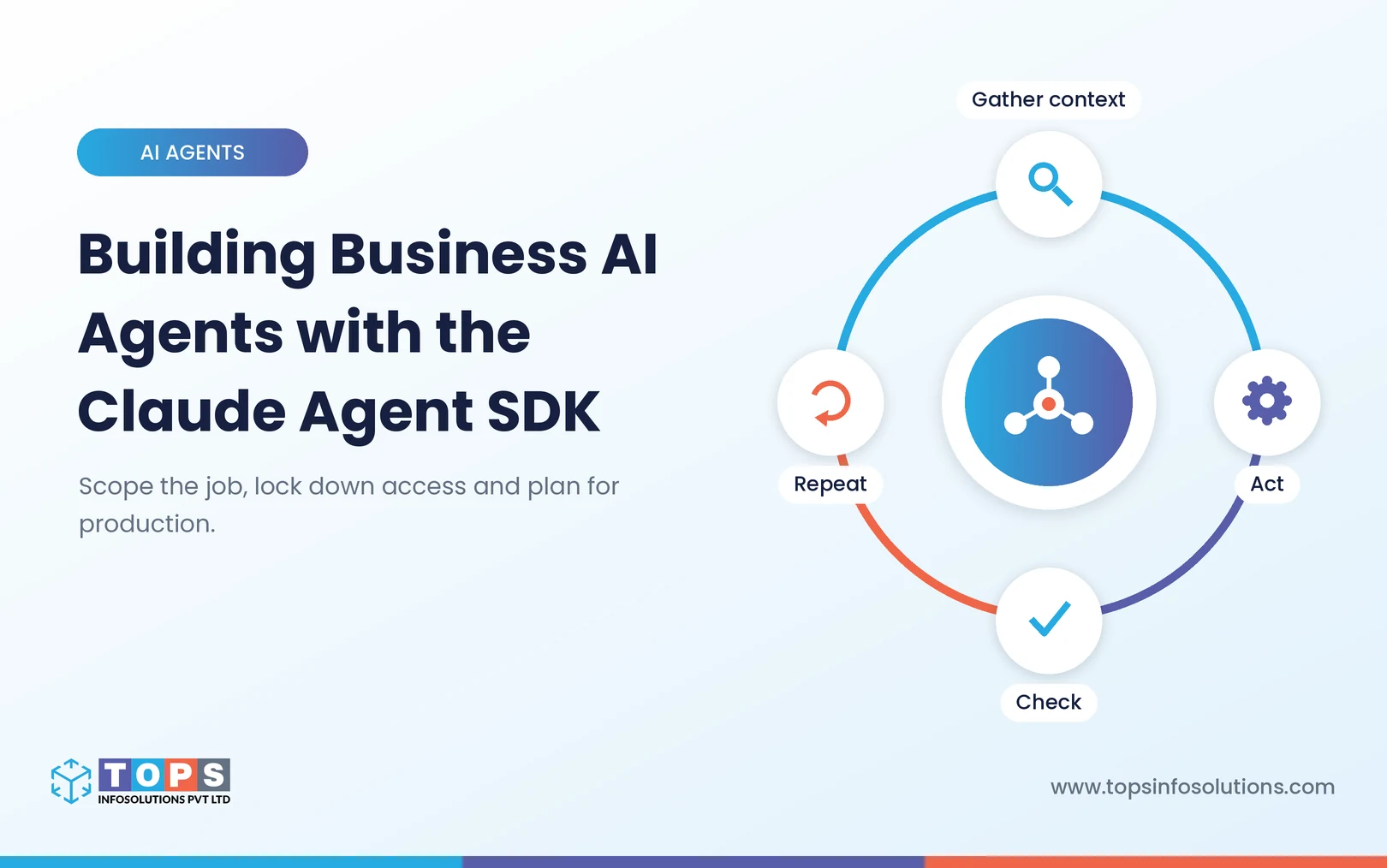
Gather context, act, check, repeat
Anthropic describes the agent loop in four stages:
- The agent gathers the context it needs,
- takes action through tools,
- checks its work,
- repeats until the result is right
The check stage is what separates a dependable agent from a chatbot with tools. Rules give precise feedback and visual checks catch layout problems. A second model can judge tone, though Anthropic warns that approach is less reliable and adds cost.
Context and actions: what the agent works with
For context, Anthropic suggests starting with agentic search: the agent searches files and folders with ordinary commands, so how you organize the data becomes part of the design. Subagents work in parallel with their own context, and compaction summarizes older messages on long runs.
For action, custom tools come first, because they are the most prominent options the agent sees. Scripts and generated code handle flexible work, and MCP connects systems like Slack, GitHub, and Google Drive without custom integration code.
How Do You Keep a Business Agent Inside Its Limits?
Access is where an agent becomes useful, and where it becomes risky. The SDK gives you several layers of control, from permission rules to human approval and credential handling. Set them before the first run, not after.
How the SDK decides whether a tool call runs
Each time the agent wants to use a tool, the SDK runs six checks in a fixed order:
- Hooks your code registers can block the call.
- Deny rules block matching calls.
- Ask rules send the call to your approval step.
- The permission mode applies.
- Allow rules approve matching calls.
- Anything still undecided goes to your approval callback.
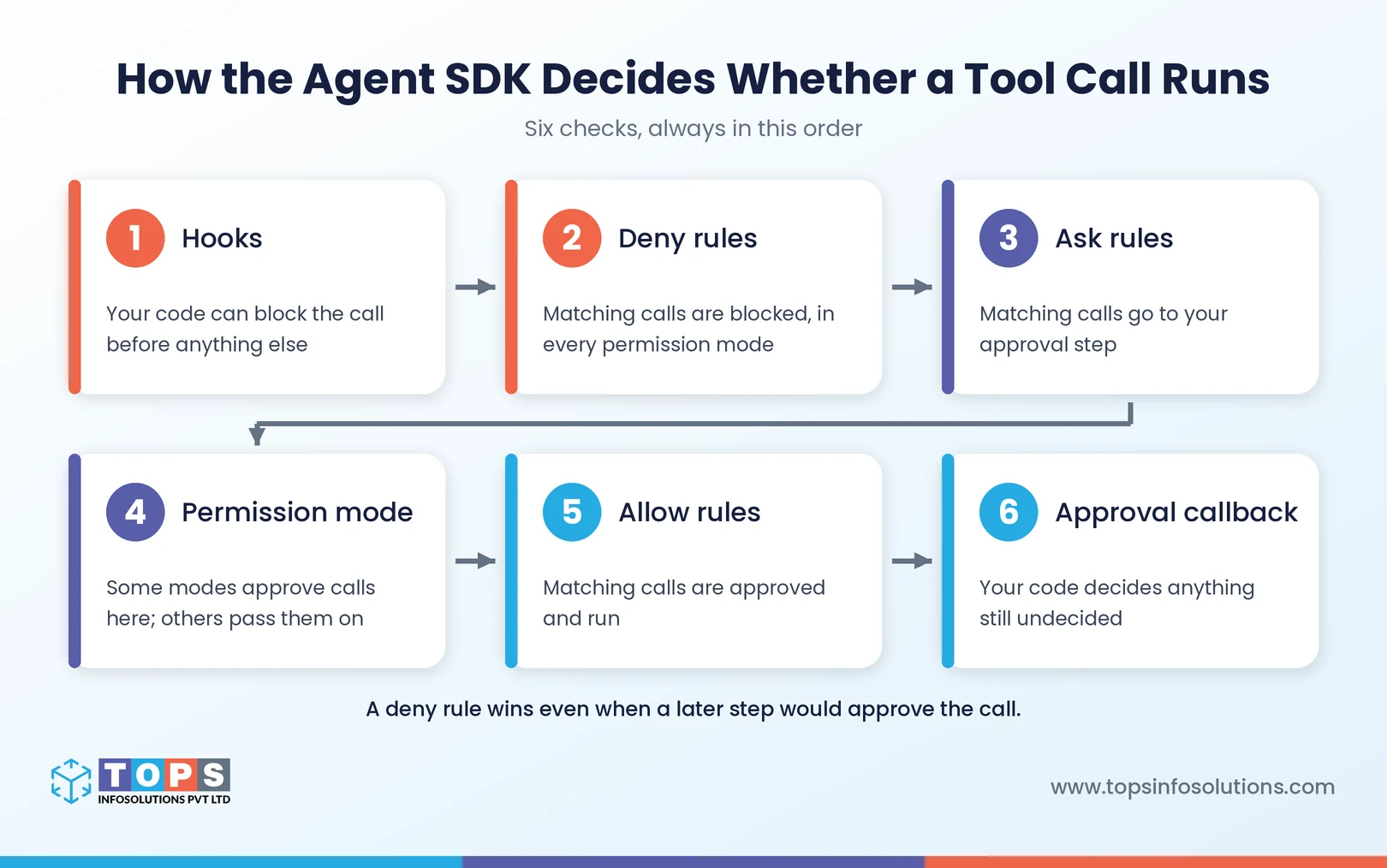
Deny rules hold even in the most permissive mode, and a hook that says yes cannot override them.
Start locked down
For an agent that runs unattended, pair an explicit list of allowed tools with dontAsk mode. A call that would need approval and isn’t on the list is refused, instead of waiting for a prompt nobody will answer. A tool you remove entirely is one the agent never sees.
Be careful with bypass mode. It approves tool calls that no deny rule, ask rule, or hook stops, and an allow list does not narrow it. Anthropic advises using it only in controlled environments.
Put a person in front of the risky steps
Approval runs as a callback in your own code, so your application decides how to ask and who answers. Plan mode lets the agent propose changes without making them. Checks that must run on every call belong in a PreToolUse hook, which runs before every other step.
Set a turn limit as well. Sessions don’t time out on their own, so maxTurns is how you bound a run.
Keep credentials out of the agent
Anthropic’s hosting guide recommends authenticating users at a gateway in front of the agent. An outbound proxy should add tool API keys after a request leaves the container, so the agent doesn’t hold them. The same proxy can enforce a domain allowlist and log requests.
Our write-up on building MCP servers for AI agents covers the same permission and audit questions from the integration side.
| From our own builds For a manufacturer with three plants, we built a Claude assistant on top of their SQL Server ERP. Here is how the three decisions in this section played out.
The case study reports ad-hoc reports dropping from one to two days to minutes, with 29 recurring reports now automated. That build used LangGraph rather than the Agent SDK, but the lessons carry over: start read-only, tie access to a signed-in user, and put a person in front of anything that will run on its own. |
What Does Running One in Production Involve?
A working demo says little about running an agent every day. Production raises different questions: where its state lives, which hosting pattern fits the job, what it costs, and how you’ll spot problems.
Each agent is a long-running process, not an API call
Each session runs as its own Claude Code subprocess, with a shell, a working directory and a transcript on local disk. A restart, scale-down or move to another node loses that state unless transcripts are mirrored to a session store.
Match the session pattern to the job
| Pattern | How it runs | Business example |
|---|---|---|
| Ephemeral | One container per task, destroyed when done | Invoice and receipt extraction |
| Long-running | Persistent containers serving ongoing work | An email agent that triages incoming mail |
| Hybrid | Spins down when idle, resumes from a session store | A support agent that loads ticket history |
| Multi-agent | Several agents in one container | Agents that must work closely together |
What it costs to run
Anthropic suggests 1 GiB of RAM, 5 GiB of disk and 1 CPU per agent as a starting point, and treats that as a floor. The same guide says model usage typically outweighs container cost by an order of magnitude or more. A minimal container runs about $0.05 an hour, while one long session can spend dollars in tokens.
The SDK reports an estimated cost for each run. Anthropic’s cost tracking guide calls this a client-side estimate and points to the Claude Console for actual billing.
Monitoring and the rules of use
The SDK can export OpenTelemetry traces, metrics, and logs to your existing collector. If one container serves several customers, the hosting guide lists settings that keep one tenant’s context out of another’s session.
Agents you build for others fall under Anthropic’s Commercial Terms, with extra rules on sign-in and naming that the FAQ below covers.
Where Should Your First Agent Start?
Pick a narrow job and earn trust before widening access:
- One task whose result can be checked
- Read-only access to the systems it needs
- An explicit allow list of tools, with
dontAskfor unattended runs - A named approval step for anything that writes, sends or spends
- A test set built from real requests, grown as the agent takes on more
- Cost tracking per session from day one
One trade-off to weigh: an SDK agent is a service your team operates. If nobody will own it, Managed Agents may be the better start. Supervising agents is also becoming part of the job, as we cover in how the developer’s role is changing.
Conclusion
The Claude Agent SDK removes most of the work of building an agent loop, not the decisions: which job, which hosting model, how much access and who approves what. Settle those early.
TOPS Infosolutions is Certified in the Claude Partner Network. Our agentic AI services and AI development services teams build on Claude, and you can hire Claude Code developers to work inside your team. If you are scoping a first agent, book a 30-minute call with us.
Frequently Asked Questions (FAQs)
Not for a product or service you offer to others, unless Anthropic has approved it. Anthropic asks third-party developers to authenticate SDK agents with API keys, either from the Claude Console or through a supported cloud provider.
Besides the Anthropic API, the SDK supports Amazon Bedrock, Claude Platform on AWS, Google Cloud’s Agent Platform and Microsoft Foundry. Each is switched on with an environment variable and that cloud’s own credentials.
Start with read-only tools and an explicit allow list. Deny rules block matching calls in every permission mode, and dontAsk mode refuses calls that would otherwise need approval. Put checks that must always run in a PreToolUse hook, and route important writes through your approval callback.
You pay for model usage plus the infrastructure you host it on, and Anthropic says token spend usually outweighs container cost by an order of magnitude or more. The SDK’s per-run cost figure is an estimate for budgeting; use the Claude Console or Usage and Cost API for billing.
Choose the Agent SDK if the agent must run inside your own systems and someone will operate it. Managed Agents suits long-running work where you would rather Anthropic run the loop. Check compliance first: Anthropic says Managed Agents is not currently eligible for Zero Data Retention or HIPAA BAA coverage.
Yes. Claude branding is optional. Anthropic allows names such as “Claude Agent” or “{YourAgentName} Powered by Claude,” but not “Claude Code” or “Claude Code Agent,” and your product shouldn’t look like any Anthropic product.